
Fully open source · GPL-3.0 · Android today 完全开源 · GPL-3.0 · 目前 Android 版
A fully open-source,
Muse-style personal agent
for every device you own.
完全开源、Muse 风格的
个人智能体,面向你的所有设备。
One agent with a name and a face that does things instead of answering questions, keeps working while the app is closed, remembers you, and stops to ask before anything you could not undo. Today the whole agent runs on your Android phone with a model you bring; it already works the apps that have no API with its own hands and drives your computer from the phone; every device you own comes after that. 一个有名字、有脸的智能体:不只回答问题,而是动手做事;App 关掉了也继续干活;记得你;遇到无法撤销的操作会先停下来问你。目前整个智能体跑在你的 Android 手机上,模型由你自己带;它已经能动手操作那些没有 API 的 App、能从手机操作你的电脑;再之后是你的每一台设备。
Android 8.0 or newer, arm64 · alpha 0.1.15 · every version is signed with the same key and installs over the last. Android 8.0 以上,arm64 · alpha 0.1.15 · 每个版本同一把签名,覆盖安装即可升级。

Why nanoMuse为什么是 nanoMuse
Four things define the project. All four are in the app today. 这个项目由四件事定义,四件都已经在 App 里。
-
today已有
Muse-styleMuse 风格
One agent, not a toolbox: a name and a face, a first conversation, a feed written for you, goals worked on in the background, memory you can edit, an approval before anything you could not undo. 一个智能体,而不是一堆工具:有名字、有脸,第一次见面先聊一聊,每天有写给你的动态,目标在后台持续推进,记忆能看也能改,无法撤销的操作前先问你。
-
today已有
Fully open完全开源
GPL-3.0-or-later, the whole repository. No closed component, no account, no server you have to trust, no model you have to use. Muse, 豆包 and 千问 are products you are given; nanoMuse is one you own. 整个仓库 GPL-3.0-or-later。没有闭源组件,不用注册账号,不用信任任何服务器,也不绑定任何模型。Muse、豆包、千问是别人给你用的产品;nanoMuse 是你自己拥有的。
-
since 0.1.120.1.12 起
Any app, API or not通用:有没有 API 都能做
Most of a day in China runs through apps that never had an API. The agent tries a skill, a CLI, an MCP server or the browser first and, when you allow it, the device's own screen — looking at a screenshot and tapping the way you would, never reading the accessibility tree — with the same approvals before paying, sending or deleting. Off by default. 国内日常用的 App,大多从来没有 API。它会先试技能、CLI、MCP 服务或浏览器;你允许之后,再直接操作设备屏幕,只看截图、不读无障碍树,像你一样看、一样点——付款、发送、删除前照样要经你审批。默认关闭。
-
since 0.1.130.1.13 起
Every device多端协同
One agent, and every device you own is a pair of hands and a front door: say it on the phone, it happens on your PC; say it to your glasses, it happens on both. The phone drives your computer today; a desktop app, iOS, the web on a machine of your own and glasses follow. 一个智能体,你的每台设备都是它的一双手、一个入口:在手机上说一句,事情在电脑上办好;对眼镜说,两边一起办。手机操作电脑已经能用;之后是桌面 App、iOS、部署在你自己机器上的网页版,还有眼镜。
What it does能做什么
-
Does things动手做事
A Linux shell, a browser, MCP servers, skills in the Agent Skills format, and — with Hands on — the apps on your phone through their screens: a screenshot, one action, another screenshot, APIs tried first, a take-over for logins, the same approvals. It picks the hand the job needs and shows each step as a card you can open. Linux shell、浏览器、MCP 服务、Agent Skills 格式的技能;打开「动手操作屏幕」后,还能通过屏幕操作手机上的 App:看一张截图、做一步、再看一张,先试 API 再上屏幕,登录由你接管,审批一样不少。用哪只手它自己挑,每一步都是一张能点开的卡片。
-
Asks first关键处先问
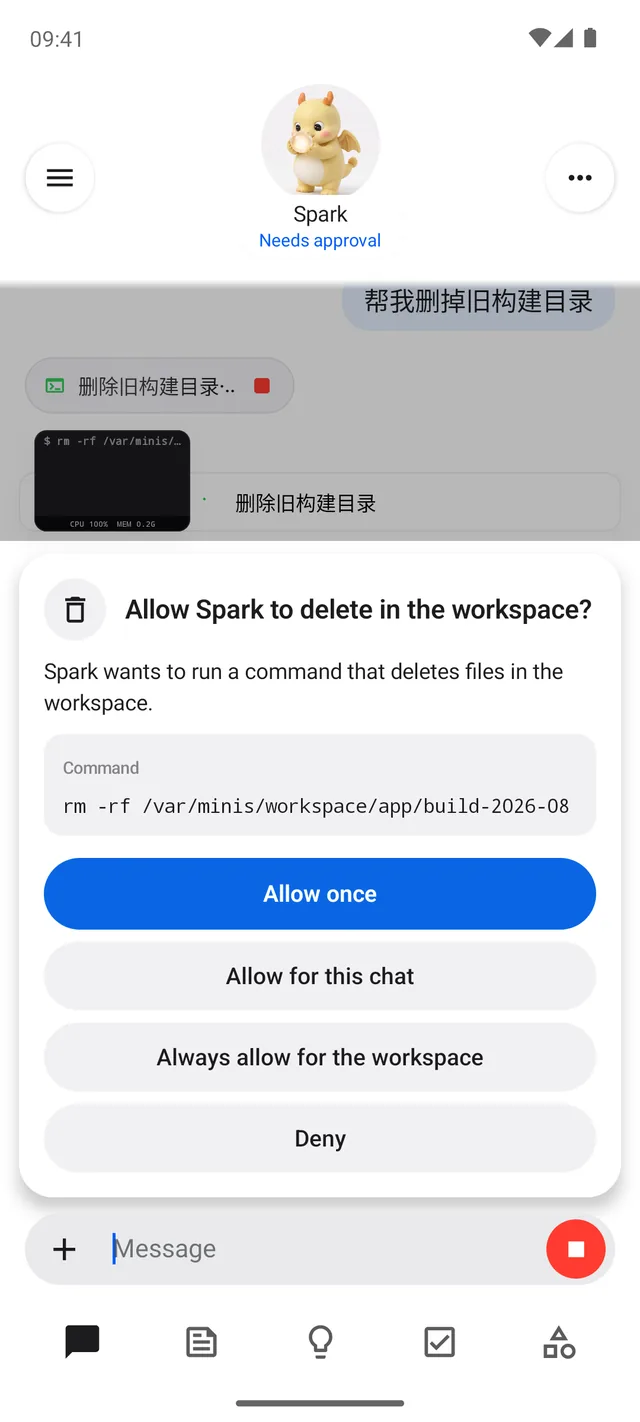
A stop before deleting, sending or paying, scoped to once, this chat or always — per recipient, domain or folder. Passwords and codes are always yours to type. 删除、发送、付款前先停下来问你:只允许这一次、这次对话,或者对这个收件人 / 域名 / 目录一直允许。密码和验证码永远由你自己输入。
-
Keeps going一直在干
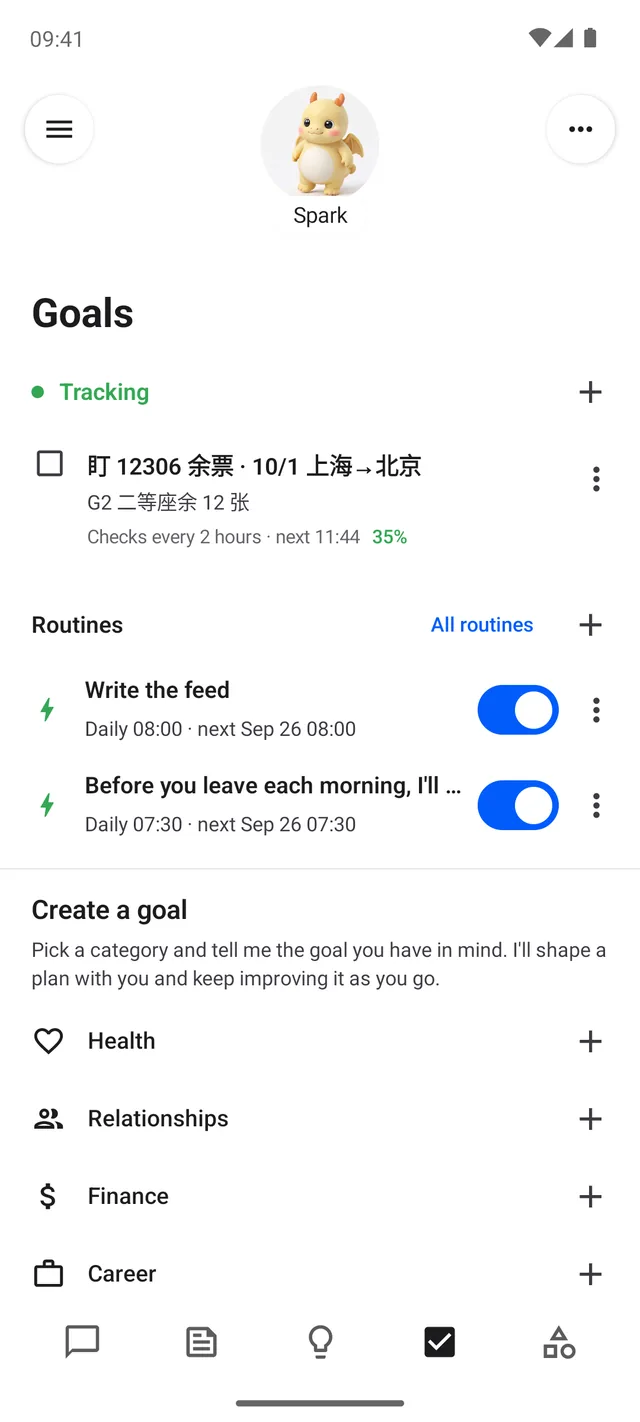
Goals checked on a schedule in their own conversation, routines that run while the app is closed, the screen kept awake when it drives the phone, and a "continue?" instead of an early wrap-up. 目标在各自的会话里按时检查;例程在 App 关着时照样跑;操作手机时屏幕不会熄灭;到了步数上限会问你「继续?」,而不是草草收尾。
-
Writes you a feed写给你的动态
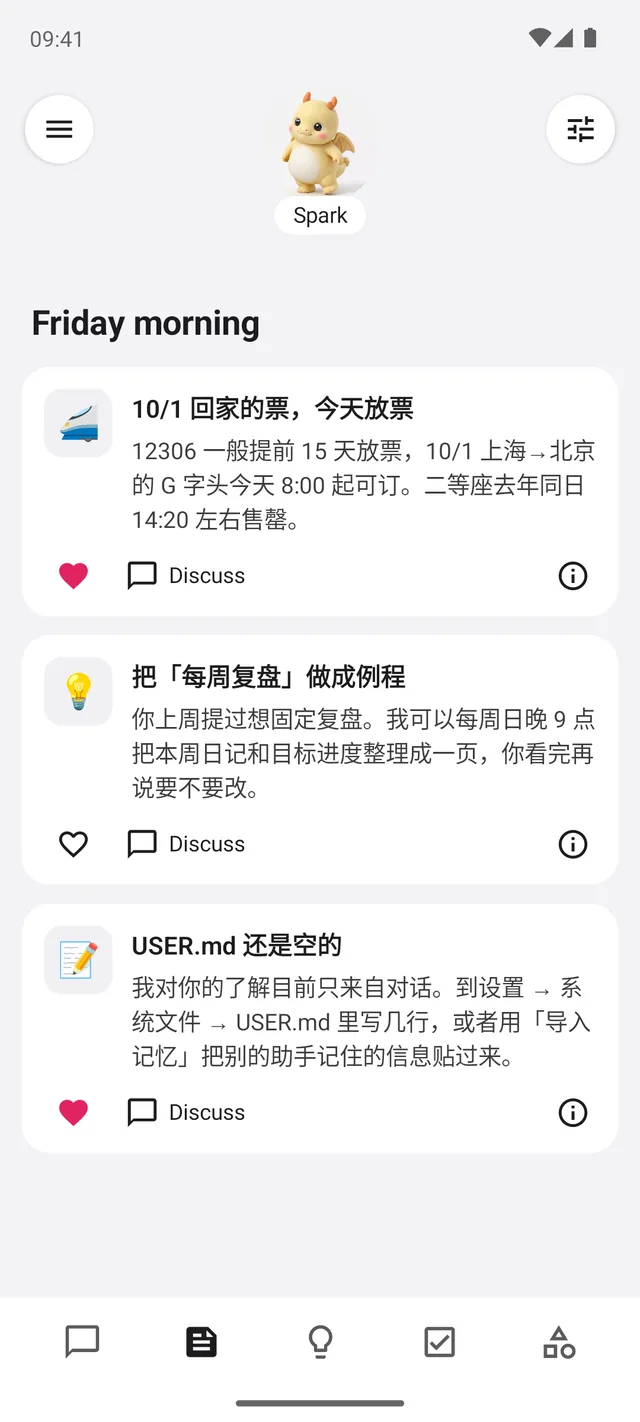
Every morning, a few short posts from what it knows about you and what you asked it to follow. Steer it with one sentence. 每天早上几条短帖,来自它对你的了解和你让它留意的事。说一句话就能调整方向。
-
Remembers you记得你
Who it is, what it knows about you, what it remembers and when it wakes are four Markdown files you can read and edit. Bring what another assistant knew. 它是谁、了解你什么、记住了什么、什么时候醒来——四个 Markdown 文件,你都能看、能改。别的助手对你的记忆,也可以直接导进来。
-
Has a face有一张脸
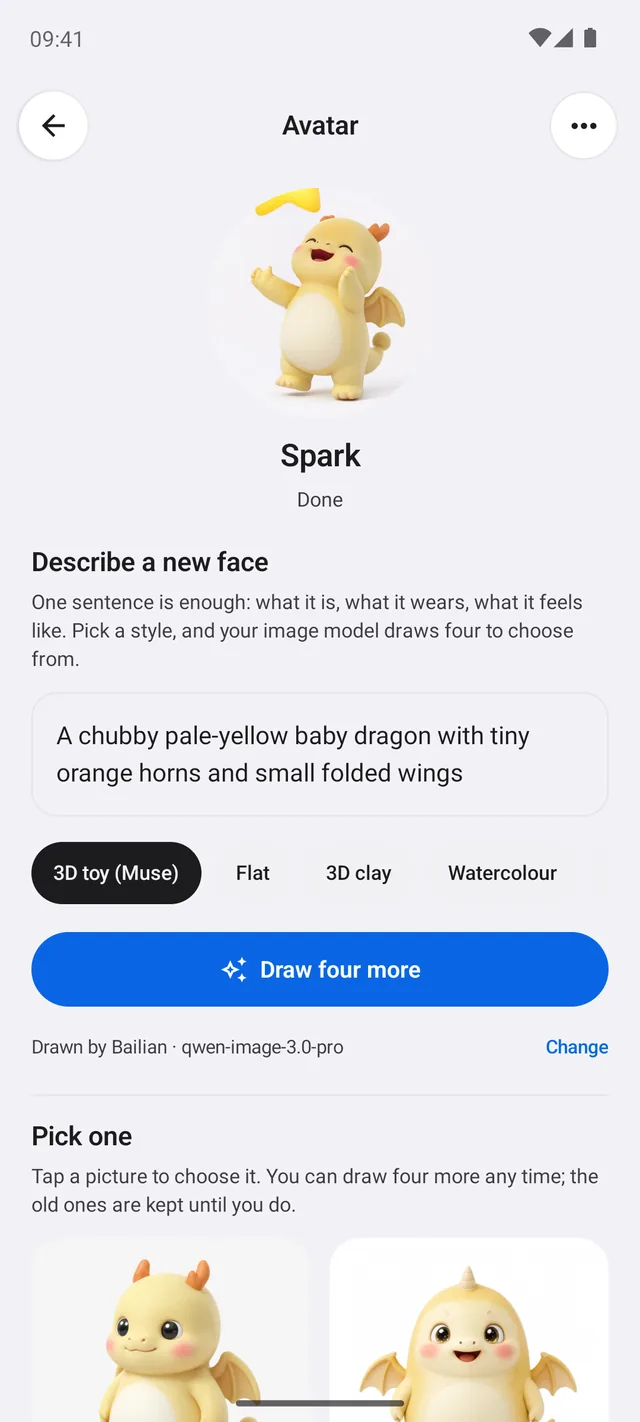
Describe one, your image model draws four, you pick. It breathes at rest, bobs while it works, tilts when it needs you, pops when a task lands. 描述一句,你的图像模型画四张,你挑一张。休息时呼吸,工作时点头,需要你时歪头,任务完成时跳一下。
How it works怎么工作
On the phone在手机上
The app is OpenMinis 1.13, modified: a complete on-device agent — Alpine Linux under proot, a shell, a WebView browser, MCP, skills, scheduled tasks, the accessibility service — with the home, the memory, the goals, the feed and the guardrails nanoMuse adds on top. All inside the APK: no server, no account, no cloud VM. Files, memory and the avatar's pictures stay in the app's private storage. App 是修改过的 OpenMinis 1.13:一个完整的端侧智能体——proot 下的 Alpine Linux、shell、WebView 浏览器、MCP、技能、定时任务、无障碍服务——nanoMuse 在上面加了主页、记忆、目标、动态和审批。全在 APK 里:没有服务器,不用注册账号,没有云端虚拟机。文件、记忆和形象的图片都留在 App 自己的私有存储里。
Many hands, one ladder很多只手,一把梯子
For each task the agent climbs a ladder: a skill, a CLI or an MCP server first; then the browser; and, with Hands switched on, the phone's own screen — a screenshot, one action, another screenshot, never the accessibility tree. Pair a computer (one Python file, a six-digit code) and a sentence on the phone runs there: its shell, its files, its browser, a look at its screen. Whichever hand, the same approval comes before deleting, sending or paying. 每个任务它顺着一把梯子往上试:先是技能、CLI 或 MCP 服务,再是浏览器,最后——打开「动手操作屏幕」之后——是手机自己的屏幕:看一张截图、做一步、再看一张,不读无障碍树。配对一台电脑(跑一个 Python 文件、填六位配对码),手机上的一句话就在那边执行:它的终端、文件、浏览器,看一眼它的屏幕。不管哪只手,删除、发送、付款前都过同一道审批。
Your models你的模型
Any OpenAI-compatible endpoint with your own key, or the OAuth sign-ins the app ships with. Three models, named — chat, image, video: one Alibaba Cloud Model Studio key for all three, or a provider per model. Image and video are optional, and the agent tells you when one is missing; Hands needs a chat model that can read a screenshot. Messages go only to the models you configured. 任何 OpenAI 兼容接口配你自己的 key,或者 App 自带的 OAuth 登录。三个模型分开说——对话、图像、视频:一把阿里云百炼的 key 跑三个,或者每个模型各接一家。图像和视频可选,缺哪个它会开口告诉你;「动手操作屏幕」需要一个能看图的对话模型。消息只发给你配置的模型。
Open开放
GPL-3.0-or-later, the whole repository, every edit to upstream marked. One small version per stage, each a GitHub release built from its tag, signed with the same key, installed by hand over the last. Not affiliated with Meta; Muse is a trademark of Meta Platforms, Inc. 整个仓库 GPL-3.0-or-later,对上游的每处修改都有标记。一个阶段一个小版本,每个都是从对应 tag 构建的 GitHub Release,同一把签名,手动覆盖安装。与 Meta 无关;Muse 是 Meta Platforms, Inc. 的商标。
Next to Muse and OpenMinis和 Muse、OpenMinis 放在一起看
Muse is the product it takes its style from; OpenMinis is the on-device runtime the app is built on. Muse 是它的风格参照;OpenMinis 是 App 所基于的端侧运行时。
| Meta Muse | OpenMinis | nanoMuse | |
|---|---|---|---|
| Where the agent runs智能体跑在哪 | Meta's cloud VM, one per userMeta 的云端 VM,每人一台 | The phone it is installed on装了它的那台手机 | The phone today; a computer of yours next; wherever you say, later目前在手机上;下一步到你的电脑上;再之后你说在哪就在哪 |
| Shape形状 | One agent with a name and a face, a feed, goals, a Sentinel一个有名字、有脸的智能体,动态、目标、Sentinel | Sessions, tools and settings — a workbench会话、工具、设置——一个工作台 | One agent, a name and a face, a feed, goals on a schedule, memory you can edit一个智能体:有名字和脸、动态、按时检查的目标、能改的记忆 |
| Before something irreversible无法撤销的操作前 | The Sentinel model approvesSentinel 模型审批 | Per-tool permissions按工具授权 | A stop with scope: once, this chat, always for this recipient, domain or folder; passwords never typed by the agent停下来问你,并记住范围:只此一次、本次对话,或对这个收件人 / 域名 / 目录一直允许;密码从不由它输入 |
| Apps without an API没有 API 的 App | Out of reach — the VM never touches your phone碰不到——云端 VM 够不着你的手机 | An accessibility CLI the model can call, on AndroidAndroid 上有一个模型可以调用的无障碍 CLI | The screen as a hand: screenshots only, APIs tried first, you take over for logins, the same approvals — since 0.1.12把屏幕当手:只看截图,先试 API,登录由你接管,同一套审批——0.1.12 起 |
| Other devices其他设备 | Many clients of one VM; the VM does not touch your devices多个客户端连同一台 VM;VM 不碰你的设备 | The one it is installed on只有装了它的那一台 | One agent across your devices: the phone drives your PC since 0.1.13, then every device, both ways一个智能体,跨你的所有设备:0.1.13 起手机能操作电脑,之后所有设备双向互通 |
| Models模型 | Meta'sMeta 的 | Bring your own自己带 | Bring your own — chat, image and video, or one Model Studio key for all three自己带——对话、图像、视频三个模型,或一把百炼 key 全包 |
| Licence许可 | Closed闭源 | GPL-3.0 | GPL-3.0-or-later, built on OpenMinisGPL-3.0-or-later,基于 OpenMinis |
Versions版本
- 0.1.1FoundationOpenMinis as nanoMuse — icon, name, colours, one signing key.OpenMinis 变成 nanoMuse——图标、名字、配色、一把签名。
- 0.1.2IdentityA name and a face; a first conversation that names the agent.有了名字和脸;第一次对话里给它起名。
- 0.1.3HomeOpens on a chat; Ideas, Goals and Library; side chats in a drawer.打开就是对话;点子、目标、资料库;旁聊在抽屉里。
- 0.1.4GuardrailsApprovals with scope before deleting, sending, paying.删除、发送、付款前带范围的审批。
- 0.1.5MemoryThe feed, the system files, memory import, "continue?".动态、系统文件、记忆导入、「继续?」。
- 0.1.6AvatarA face you choose, posed and animated; motion everywhere.你挑的脸,有姿势有动作;处处有动效。
- 0.1.7WelcomeThe first run: a welcome screen with the three steps — provider, its models, meet the agent.第一次运行:欢迎页带三步——服务商、它的模型、认识它。
- 0.1.8PolishThe shell finished: the type scale, the composer pill, only the name under the face, the settings pages restyled to match.外壳打磨:统一字体排印、胶囊输入框、脸下只留名字、设置页统一风格。
- 0.1.9PortraitChanging the face from the chat: "change your avatar to…", four takes, poses, a share card; the agent's page behind the face; five avatar sizes.在对话里换脸:说一句「把虚拟形象换成…」,四张候选任选,配好姿势,还有分享卡;点脸进它的资料页;形象大小五档。
- 0.1.10MotionThe three models named — chat, image, video — in Settings and in what the agent knows; with a video model the face gets a looping clip per state; pictures and clips on request.三个模型说清楚——对话、图像、视频——在设置里,也在它自己知道的事里;设了视频模型,每个状态一段循环短片;按需生图生视频。
- 0.1.11HatchThe built-in dragon, stills and clips in the APK; the first conversation read by the chat model, its own names in your language; one Model Studio key for all three models, or a provider per model.内置小龙,静态图和短片都在 APK 里;第一次对话由对话模型来读,给自己提的名字跟着你的语言;一把百炼 key 跑三个模型,或者每个模型各接一个平台。
- 0.1.12HandsThe phone's screen as a hand: it looks at a screenshot — never the accessibility tree — and taps, types and swipes in the apps that have no API; APIs first; a floating capsule with Stop; you take over for logins; the same approvals; off by default.手机屏幕当手:只看截图、不读无障碍树,在没有 API 的 App 里点、打字、滑动;先试 API;带「停止」的悬浮胶囊;登录由你接管;同一套审批;默认关着。
- 0.1.13ReachThe phone drives your computer: run one Python file on the PC, pair it by code, and a sentence on the phone runs there — shell, files, browser, a look at the screen — with the results and approvals back on the phone. One way, for now.手机操作你的电脑:在电脑上跑一个 Python 文件、用配对码配对,手机上的一句话就在那边执行——shell、文件、浏览器、看一眼屏幕——结果和审批回到手机。暂时单向。
- 0.1.14HomeA fix: coming back to the app — from a notification, the tool capsule or Hands finishing a run — lands in its own home again, not on the OpenMinis chat screen.修复:从通知、悬浮胶囊或「动手」跑完之后回到 App,落回它自己的主页,而不是 OpenMinis 的聊天页。
- 0.1.15StageWatching the hands: a glow along the edges while they work, a turning ring with the action’s name where they are about to tap, a ripple as they land, the ring riding along a swipe — after UI-TARS-desktop’s ScreenMarker. The capsule lets every gesture through and steps aside; the app-icon quick actions open in the home.看得见的动手:干活时四边有呼吸的光,要点的位置先出现带动作名的转动圆环,落指时荡开波纹,滑动时圆环沿路径滑过——参考 UI-TARS-desktop 的 ScreenMarker。胶囊让手势穿过并主动让位;图标快捷方式在主页里打开。
- 0.2.0BetaPolish from the first weeks of use; the first beta.头几周使用后的打磨;第一个 beta。